有时候我们需要制作
linux-headers-xxxx.deb我们可以依靠该target来制作所需的debain包。
前言
首先我们阅读kernnel/Makefile
# Packaging of the kernel to various formats
# ---------------------------------------------------------------------------

%src-pkg: FORCE
	$(Q)$(MAKE) -f $(srctree)/scripts/Makefile.package $@
%pkg: include/config/kernel.release FORCE
$(Q)$(MAKE) -f $(srctree)/scripts/Makefile.package $@上面发现需要进入scripts/Makefile.package 所以这里摘录scripts/Makefile.package中的帮助:
# Help text displayed when executing 'make help'
# ---------------------------------------------------------------------------
PHONY += help
help:
	@echo '  rpm-pkg             - Build both source and binary RPM kernel packages'
	@echo '  srcrpm-pkg          - Build only the source kernel RPM package'
	@echo '  binrpm-pkg          - Build only the binary kernel RPM package'
	@echo '  deb-pkg             - Build both source and binary deb kernel packages'
	@echo '  srcdeb-pkg          - Build only the source kernel deb package'
	@echo '  bindeb-pkg          - Build only the binary kernel deb package'
	@echo '  snap-pkg            - Build only the binary kernel snap package'
	@echo '                        (will connect to external hosts)'
	@echo '  dir-pkg             - Build the kernel as a plain directory structure'
	@echo '  tar-pkg             - Build the kernel as an uncompressed tarball'
	@echo '  targz-pkg           - Build the kernel as a gzip compressed tarball'
	@echo '  tarbz2-pkg          - Build the kernel as a bzip2 compressed tarball'
	@echo '  tarxz-pkg           - Build the kernel as a xz compressed tarball'
	@echo '  tarzst-pkg          - Build the kernel as a zstd compressed tarball'
	@echo '  perf-tar-src-pkg    - Build the perf source tarball with no compression'
	@echo '  perf-targz-src-pkg  - Build the perf source tarball with gzip compression'
	@echo '  perf-tarbz2-src-pkg - Build the perf source tarball with bz2 compression'
	@echo '  perf-tarxz-src-pkg  - Build the perf source tarball with xz compression'
	@echo '  perf-tarzst-src-pkg - Build the perf source tarball with zst compression'

PHONY += deb-pkg srcdeb-pkg bindeb-pkg

deb-pkg:    private build-type := source,binary
srcdeb-pkg: private build-type := source
bindeb-pkg: private build-type := binary

deb-pkg srcdeb-pkg: debian-orig
bindeb-pkg: debian
deb-pkg srcdeb-pkg bindeb-pkg:
	+$(strip dpkg-buildpackage \
	--build=$(build-type) --no-pre-clean --unsigned-changes \
	$(if $(findstring source, $(build-type)), \
		--unsigned-source --compression=$(KDEB_SOURCE_COMPRESS)) \
	$(if $(findstring binary, $(build-type)), \
		--rules-file='$(MAKE) -f debian/rules' --jobs=1 -r$(KBUILD_PKG_ROOTCMD) -a$$(cat debian/arch), \
		--no-check-builddeps) \
	$(DPKG_FLAGS))
我们来解释一下: 整体命令先看dpkg-buildpackage,这是一个可执行的命令,该软件主要是:
是 Debian 打包工具 `dpkg-dev` 套件中的一部分,它用于构建 Debian 软件包(`.deb` 和相关文件)。该命令帮助开发者将源代码和包描述文件(`debian/` 目录中的文件)打包为 Debian 兼容的二进制包和源包,最终生成适用于 Debian 或基于 Debian 的发行版(如 Ubuntu)的安装包。build-type会传递给dpkg-buildpackage,根据时source或binary来决定执行:
source:构建 Debian 源包(.dsc、.tar.gz)。binary:构建二进制包(.deb)。 所以我们来试试:
make -j 24 \
        ARCH=arm64 \
        -C kernel_source_code_dir
        O=kernel_build_out_dir \
        --output-sync=target srcdeb-pkg
他会编译出一个文件: linux-upstream_6.6.0-gd765b1c265b7-4.debian.tar.gz,各部分标识为:
linux-upstream表示这是一个上游版本的 Linux 内核,意味着它直接从 Linux 内核的官方源代码库获取。6.6.0是 Linux 内核的版本号,表示这是 Linux 内核的 6.6.0 版本。gd765b1c265b7是一个 Git 提交哈希(commit hash),它标识了具体的提交点。d765b1c265b7是该内核版本在 Git 版本控制系统中的唯一标识符。这意味着这是从 Linux 内核 6.6.0 的某个具体 Git 提交点生成的版本。-2表示这是该内核版本的第 2 次 Debian 打包版本(即第 2 次对相同上游版本的 Debian 修改)。Debian 通常在源包版本后附加一个打包版本号,用来区分不同的 Debian 修订版本。.tar.gz是一个压缩文件格式,表示该文件是经过 Gzip 压缩的 tar 包(归档文件)。- **
debian.tar.gz** 是 Debian 打包系统中的标准文件,它包含了该包的 **Debian 特定文件和元数据**,用于将上游的源代码构建为 Debian 软件包。 文件内容: 里面还包含了源代码
*.c文件。 我们再来试试binary:
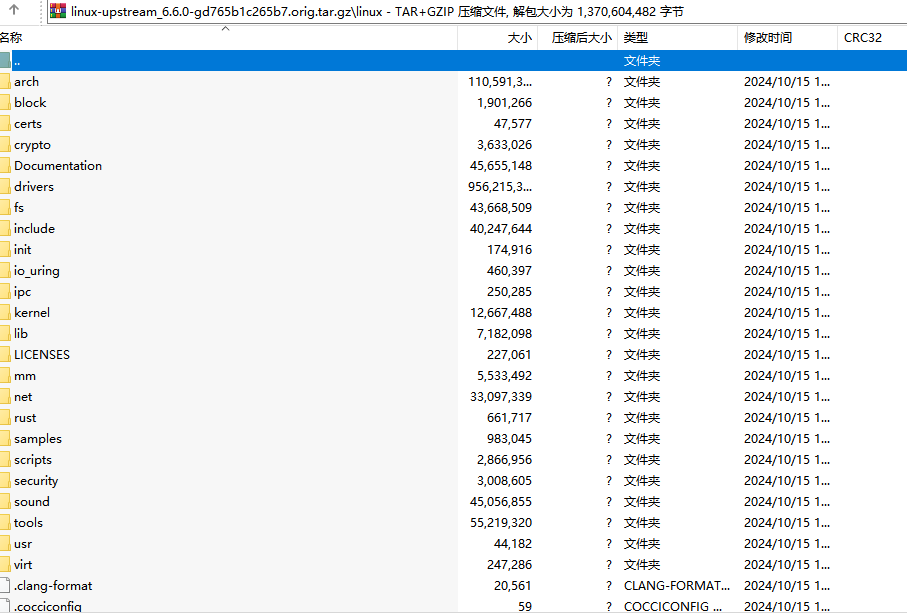 里面还包含了源代码
make -j 24 \
ARCH=arm64 \
-C kernel_source_code_dir
O=kernel_build_out_dir \
--output-sync=target bindeb-pkg这里会生成3个文件:
linux-image-6.6.0-tegra_6.6.0-gd765b1c265b7-5_arm64.deb
linux-libc-dev_6.6.0-gd765b1c265b7-5_arm64.deb
linux-headers-6.6.0-tegra_6.6.0-gd765b1c265b7-5_arm64.deb
linux-image-6.6.0-tegra_6.6.0-gd765b1c265b7-5_arm64.deb
- 功能:这个包包含了 Linux 内核的二进制映像(image),即用于启动系统的核心组件。它是特定于 Tegra 平台的 Linux 内核版本。
- 版本信息:
6.6.0:表示内核版本为 6.6.0。gd765b1c265b7:是内核源代码的 Git 提交哈希,标识了特定的提交。-5:表示这是该内核版本的第 5 次 Debian 打包版本。
- 架构:
arm64表示这个包是为 ARM 64 位架构构建的。
linux-libc-dev_6.6.0-gd765b1c265b7-5_arm64.deb
- 功能:该包提供了 Linux 内核的用户空间开发文件,主要是包含头文件和符号链接,供用户空间程序编译和链接使用。
linux-libc-dev是一个关键包,它为开发者提供了必要的库和头文件,以便编译与内核交互的程序。 - 版本信息:同样与内核版本相关,
6.6.0-gd765b1c265b7-5表示它与上述内核版本一致,并且是同一个打包版本。 - 架构:同样是
arm64。
linux-headers-6.6.0-tegra_6.6.0-gd765b1c265b7-5_arm64.deb
- 功能:这个包包含了 Linux 内核的头文件,主要用于编译内核模块和驱动程序。内核头文件提供了内核数据结构的定义和函数的声明。
- 版本信息:与内核和
linux-libc-dev包一致,表明这个头文件包是基于同一个内核版本(6.6.0)的。 - 架构:同样是
arm64。
linux-headers
linux-headers是我们在目标设备开发内核程序的重要组件,但是在构建命令上会有一些差异性。
在6.6.r1开始,我们便无法使用make intdeb-pkg制作一个含有除.C文件外的linux-headers,原来intdeb-pkg的功能被分散到了文件scripts/package/install-extmod-build中。 我们来看看其中的变化:
commit:36862e14e31611f9786622db366327209a7aede7		(2023/5/15)
将deploy_kernel_headers 改名为:install_kernel_headers
但是函数的内容不变

commit:fe66b5d2ae72121c9f4f705dbae36d4c3e9f3812		(2023/7/24)
修改install_kernel_headers内容:
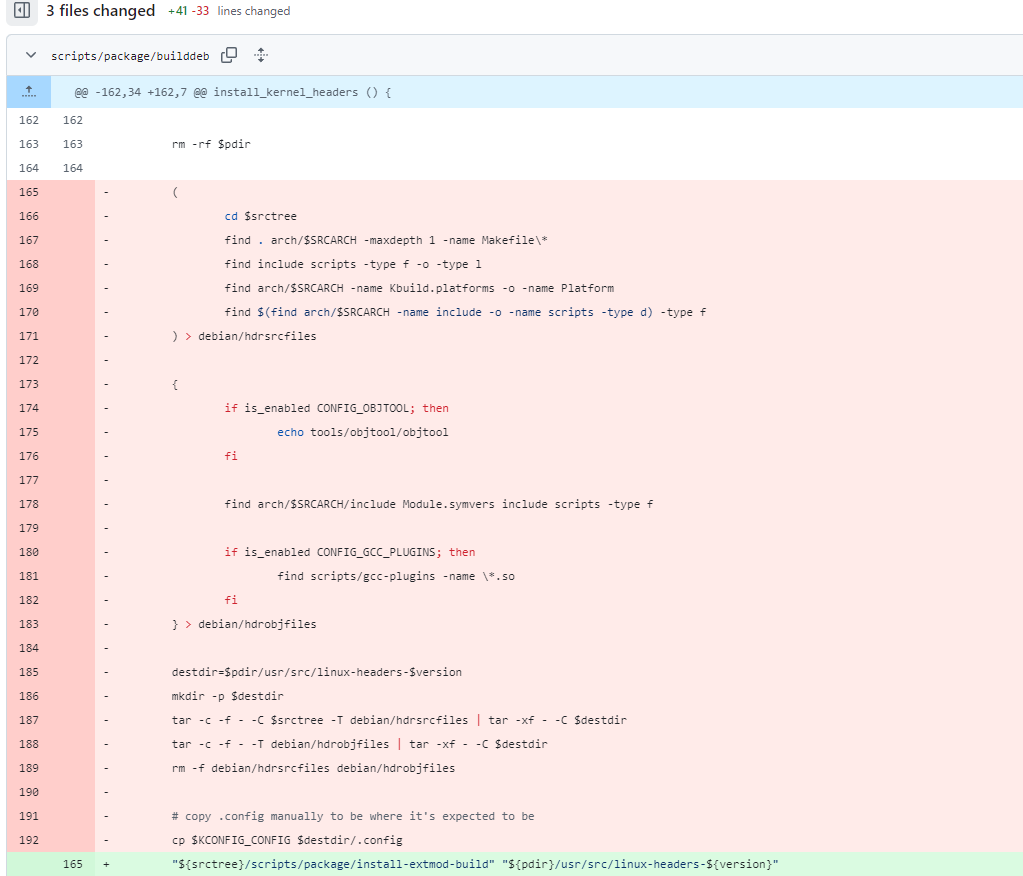 图中被删除的功能移动到文件:
scripts/package/install-extmod-build中。而该文件是被scripts/package/kernel.spec调用: 
 而
而kernel.spec文件是在文件scripts/Makefile.package中构建RPM包才会被调用的,所以可以得到一个结论,就是构建原先具有完整路径linux-headers.xx(deb.rmp),debain不再提供,转而是由rpm提供。所以在6.6版本开始,如果你使用make deb-pkg会得到linux-headers-xxx.deb只含有简单的头文件,如下图所示: 
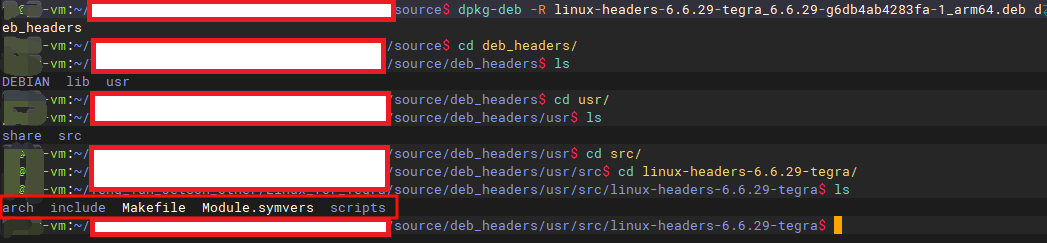 结论:如果我们想编译一个简单的
内核构建环境,可使用make deb-pkg,如果我们想编译完整的,需要使用make rpm-pkg。或者使用linux-upstream-xxxx.tar.gz。
贡献者
 Px
Px